Showing posts with label wirelless. Show all posts

Sunday, May 24, 2009

Wifi Finder


Sometimes went we need wifi wireless hotspot in public area we must open the laptop or pda phone to cek the signal of the hotspot, it's nice when we find a good signal but when it low it make frustrated. With WIFI FINDER we not necesary open our laptop to cek signal we just need WIFI FINDER. It's small it cheep and very flexible for hand carry.

ZyXEL AG225H 802.11a/b/g/n Wifi Finder, 802.11g USB 2.0 Adapter, and Soft Access Point
The ZyXEL AG-225H is the ultimate high-tech tool for the road warrior. 
The AG-225H combines 802.11a/b/g USB 2.0 adapter technology with a fully functional wireless hotspot detector all housed in a sleek device small enough to fit into any pocket. Detect any flavor of wireless network from 802.11a all the way to the newly Drafted 802.11n. The dual-band tri-mode USB adapter is equipped with a high contrast backlit LCD screen and built-in LiON battery, allowing you to scan the environment for hotspots without turning on your computer. With WPA and WPA2 support, the AG-225H can provide a secure wireless connection when used as a 54Mbps high-speed USB wireless adapter. Mac OS support brings the AG-225H to another level of functionality and compatibility never before thought possible!

Read More......

Friday, May 15, 2009

Apple Airport Express


Faster Is Better
Now with blazing 802.11n, the affordable AirPort Express is powerful enough to run a home Wi-Fi network, yet small enough to take on the road. Here's some of the ways you can integrate it into your home.
Compatibility
Part Wi-Fi access point. Part wireless router. AirPort Express just works, seamlessly and wirelessly, with all your Wi-Fi devices. In fact, it’s the easiest way for everyone in your family to share a single broadband Internet connection and USB printer without messy cables.

AirPort Utility
If you think setting up a wireless network is difficult, think again. AirPort Utility for Mac and Windows guides you through the process, and you’ll have your network up and running in minutes. AirPort Utility does most of the work for you by stepping you through the setup process quickly and easily. For the most basic setup, all you have to do is plug your AirPort Express into an electrical outlet and connect your DSL or cable modem. Then open the AirPort Utility software and just follow the onscreen instructions.
AirPort Express works effortlessly with any computer that uses Wi-Fi standards, whether it’s a Mac or a Dell, HP, IBM, or any other Windows-based PC. That’s because the AirPort Express is compatible with computers using the 802.11a, 802.11b, and 802.11g specifications, and it also works with computers that are 802.11n draft 2.0 compliant.
Product Description
Now with blazing 802.11n, the affordable AirPort Express is powerful enough to run a home Wi-Fi network, yet small enough to take on the road. Share your wireless network with up to 10 users, print documents, photos, and more from any room in the house to one central printer, play iTunes music through your stereo or powered speakers using AirTunes, and more.

Read More......

Wireless Sun/Moon Weather Station


Gardeners, hikers, beach combers, farmers, sailors, skiers, daily commuters and anyone who needs to keep an eye on the weather and temperatures indoors and out will love this wireless weather station from La Crosse Technology. With 15 forecast icons, the station makes it easy to plan for that outdoor barbecue, beach outing, or ski day, helping you decide what to wear and when to schedule.
With plenty of versatile features, the unit displays sunrise/sunset and moon phases for 99 U.S. and Canadian cities. A remote sensor helps you monitor outdoor temperatures and the main console displays temperatures and humidity levels inside. The remote sensor works from up to 330 feet away for monitoring temperatures and humidity levels in the greenhouse, shop, and garage. It works great indoors too, helping monitor temperatures in the baby's room, music room, and near plumbing you don't want to freeze up. The main console receives data from up to 3 remote locations with the purchase of additional sensors. A great way to help kids dress for the weather, the weather station's Oscar Outlook icon is always dressed appropriately for weather ahead, with outfits ranging from swimming trunks to a coat, hat and scarf, and other weather-themed accessories in tote, such as a beach chair, an umbrella, or a snow man.
The station's precision clock receives signals from the U.S. Atomic Clock, automatically setting itself to exact time accurate to the second. A manual override setting lets you set date and time yourself for areas where Daylight Savings Time doesn't apply (otherwise the handy unit sets itself for DST, too). A large button lets you toggle between an array of time and weather displays. A flip out table stand sets up quickly on counter, windowsill, or desk, or the unit hangs easily from any wall in the home or office. This weather station is compatible with La Crosse Technology TX29U-IT 915 MHz Wireless Temperature Sensor.

Read More......

Friday, May 1, 2009

Linksys WRT54G Ultimate Hacking


This book will teach the reader how to make the most of their WRT54G series hardware. These handy little inexpensive devices can be configured for a near endless amount of networking tasks. The reader will learn about the WRT54G's hardware components, the different third-party firmware available and the differences between them, choosing the firmware that is right for you, and how to install different third-party firmware distributions. Never before has this hardware been documented in this amount of detail, which includes a wide-array of photographs and complete listing of all WRT54G models currently available, including the WRTSL54GS.

Once this foundation is laid, the reader will learn how to implement functionality on the WRT54G for fun projects, penetration testing, various network tasks, wireless spectrum analysis, and more! This title features never before seen hacks using the WRT54G. For those who want to make the most out of their WRT54G you can learn how to port code and develop your own software for the OpenWRT operating system.*Never before seen and documented hacks, including wireless spectrum analysis*Most comprehensive source for documentation on how to take advantage of advanced features on the inexpensive wrt54g platform*Full coverage on embedded device development using the WRT54G and OpenWRT

Read More......

Wednesday, April 8, 2009

video mikrotik world wireless record

here's the movie i'am sorry i can't embeded the link
http://www.tiktube.com/?video=34
download link : http://www.tiktube.com/torrent/304km_Wifi_record_with_MikroTik.torrent
http://www.tiktube.com/video/db16ecc148c56c3e0d9f571dc46413e4.flv

Read More......

Mikrotik Wireless long distance

wireless world recordwireless world record

304km Wifi record with MikroTik
i found this news from mikrotik forum, here the news.
On 16-06-2007, we (CISAR, a radioHAM italian association) have realized a 304km link (about 100km ground and 200km sea surface), between Amiata mount (1734asl) and Limbara mount (1300 ca asl).
We utilized a pair of wrap board (but they will be replaced by a new RB532 soon), a pair of Ubiquiti XR5, and a pair of handmade antenna (120cm satellite dish for the surface, and a bronze ball-bearing extracted from a bus).
The signal received on both end was from -58dBm to -62dBm, bitrate between 12 and 48Mbps, CCQ between 70 and 100.
wireless world recordwireless world record
On the moment i'm writing, this seems to be a distance world record (the precedent was from "Politecnico di Torino" on Italy, 295km).
The people which partecipate on this WR:
Amiata Mount
- Giuseppe IW5CGM (CISAR president);
- Antonello IK0TCL
- Mirco IZ3HAD (me)
Limbara Mount
- Natale IW0UIF
- Paolo IK0PCJ (antenna's constructor)
- Mauro IK0YUK
ref[forum.mikrotik.com, wikki.mikrotik.com, tiktube.com]

Read More......

Friday, September 19, 2008

New Product From RouterBoard.com

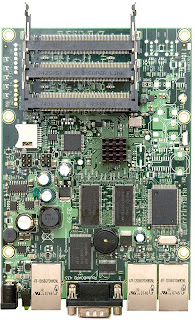
rb433ah
RouterBOARD 433AH
The RB433AH is a more powerful version of the
standard RB433. The 128MB DDR will be capable
of supporting new RouterOS features coming. The
microSD slot supports an additional memory card that
can be used for a Dude database and other features
to be announced in during Spring ‘08.
The 680MHz Atheros MIPs 24K CPU, that can
be overclocked to 800MHz, with a 64KB/32KB
instruction/data cache is probably the fastest CPU
used in low cost wireless access points.
The three Ethernets and mpci slots give you ample
data interfaces to put the big CPU power to work.
The RB433 and RB433AH replace the RB133 and
RB333 positions of our product line.

CPU Atheros AR7161 680MHz network processor (Tested at 800MHz)
Memory 128MB DDR SDRAM onboard memory
Boot loader RouterBOOT
Data storage 64MB onboard NAND memory chip and microSD
Ethernet Three 10/100 Mbit/s Ethernet ports with Auto-MDI/X
miniPCI Three MiniPCI Type IIIA/IIIB slots
Extras Reset switch, Beeper
Serial port One DB9 RS232C asynchronous serial port
LEDs Power, NAND activity, 5 user LEDs
Power options Power over Ethernet: 10..28V DC (except power over
datalines). Power jack: 10..28V DC. Voltage monitor.
Dimensions 10.5 cm x 15 cm, 137 grams
Power consumption ~3W without extension cards, maximum – 25 W, 16W output to cards
Operating System MikroTik RouterOS v3, Level5 license

ref[routerboard.com]

Read More......

Tuesday, April 22, 2008

wirelless discovery tool's

wirelless discovery tool's
Long time not update this blog, try to open the history in my browse software.
yeah in bookmark i find some good link, may i can share this in my blog.
This is about wirelss 802.11b/g discovery tool's, ever here hotspot? yes it's internet service free or open in public place or private place.
in windows xp we find in side bar beside the clock's menu a wifi detector, from that we can know the wifi in our coverage.
i'd like to share a lot link for wifi discovery tool's

Wi-Fi Discovery Tools


The most popular maybe a stumbler, but stumbler only work in windows. that software can't use for wireless site survey or anything else about site coverange test.

Read More......

Tuesday, March 18, 2008

RF atenuator


Your wireless to much Noise? it may be cause to high signal. Here's the solution.
Attenuators are used in a wide variety of applications and can satisfy almost any requirement where a reduction in power is needed. Attenuators are used to extend the dynamic range of devices such as power meters and amplifiers, reduce signal levels to detectors, match circuits and are used daily in lab applications to aid in product design. Attenuators are also used to balance out transmission lines that otherwise would have unequal signal levels.

For best results when selecting an RF attenuator for a given connector style, make sure to consider the amount of power being absorbed and the acceptable level of reflection (VSWR) that can be tolerated over the operating frequency range.
reference:
e-meca
wikipedia

Read More......